

Camera Events Tab
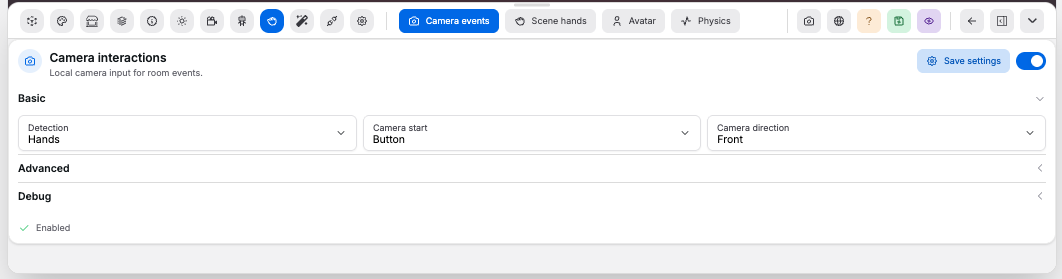
Use Camera events to configure local camera-driven room events. Camera frames stay in the browser; only settings are saved on the room.
Card#
Controls:
Save settings: writes the current values to the roomEnabled: turns camera interactions on or off for this room; toggling also saves- Status indicator: shows
EnabledorDisabledfor the current saved state
Basic#
Controls:
Detection: choosesMotion,Object,People,Hands, orHolisticdetectionCamera start: choosesButtonorOn room startCamera direction: choosesFrontorRearcamera when the device offers both
Advanced#
Controls:
Sensitivity: scales overall detection responsiveness. Range0.01to1, step0.01Motion threshold: confidence threshold required to fire a detection. Range0.001to0.5, step0.001Minimum pixels: minimum changed pixels needed to fire. Range1to20000, step1Sample interval: time between frame samples, in milliseconds. Range50to5000, step10Cooldown: minimum time between detections, in milliseconds. Range0to60000, step100Warmup: delay after camera start before reacting, in milliseconds. Range0to10000, step100
Debug#
Controls:
Debug preview: shows the compact camera preview window in the editorHide video in live mode: hides the preview window for shoppers in published roomsTrace: enables runtime detection tracingTrace level: choosesOff,Summary, orVerboseLog retention: days to keep trace logs. Range1to365, step1
Trace table:
- Lists the most recent detections fired while this tab is open
- Columns:
Time,Detection,Changed pixels,Changed ratio, andConfidence
Good to know:
- The runtime dispatches the
immersive:interaction-detectedbrowser event with motion metrics Holisticdetection uses MediaPipe Holistic for body pose and both handsScene handsandAvatarrequire camera events- Particle effects can react to camera interactions; see Particles Tab