

Environment Drawer
Use the Environment drawer to control light, shadows, and the visual world around the room.
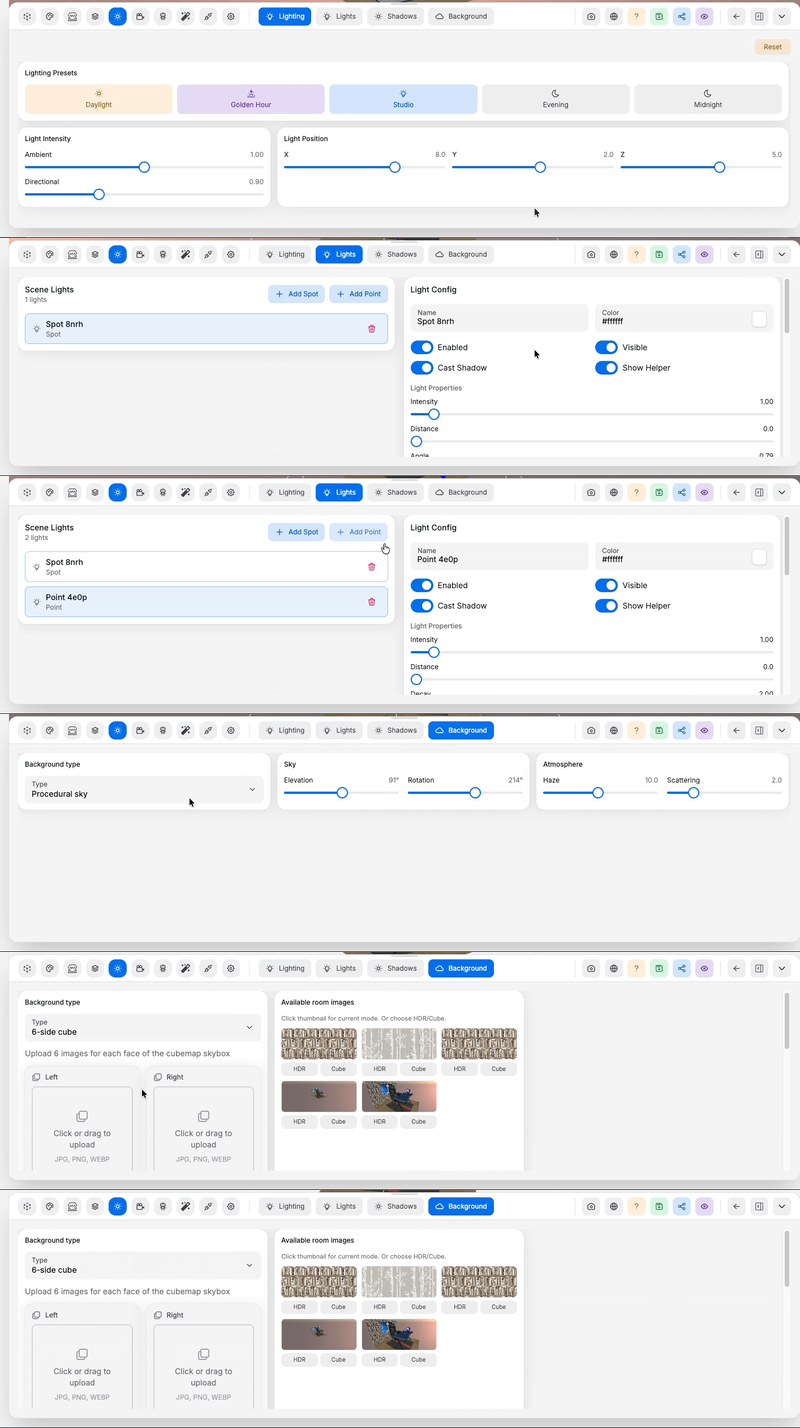
Pages in this drawer:
- Lighting Tab: change the overall mood of the room through global lighting
- Lights Tab: add or tune individual scene lights, including light target and movement tracking
- Shadows Tab: improve shadow quality, coverage, and darkness
- Background Tab: change the sky, HDR, no environment, or background treatment
Locations#
Under Locations → Procedural locations, Location type places the room in a generated setting: Grassland, Beach, Small island or Lake. A lake sits beside the room at Shore distance, toward Sea direction, sized by Lake radius, in a meadow that takes its blades and colour from the Grassland settings shown with it. With advanced rendering on, the water also follows Wave direction, Wave spread, Choppiness, Whitecaps, Light through waves and Refraction.
With room physics on, objects that fall into the water float, bob and tilt with the waves. Set how high each one floats with Buoyancy in its physics settings: 0 sinks, 1 hangs where it is, 2 floats half under. Visitors walking a player into deep water swim: Space rises, Ctrl or C dives, and they float back up when they let go.
Snow and rain#
Open Locations → Weather and choose Clear, Rain or Snow. Intensity controls how much falls. For snow, start with Gentle Snow, Flurries or Heavy Snow. Selecting a preset resets the weather controls to that preset; it does not change your lighting, fog or room objects.
Expand Appearance and motion to adjust particle size and variation, fall speed and variation, wind speed and direction, turbulence, flutter, tumbling, opacity, softness, distance fading, near-camera fading and fog blending. Sizes and distances are in metres; speeds are in metres per second. Wind direction 0° points along +X and 90° along +Z. Zero variation, turbulence, flutter or tumble speed disables that movement or variation. Fog blending uses the room fog color.
Visible roofs, glass and covered surfaces automatically block precipitation beneath them.
Shelter follows visible geometry; a room without roof geometry is exposed. Weather is available
in flat worlds. Save the room to keep the settings. Connected agents can discover the same
controls and ranges through room_schema for scene.environment and room_examples named
weather.
Snow building up on the floor#
Snow gradually covers exposed ground. On Grassland it follows hills and valleys, and stronger cover whitens grass blades too. Under Appearance and motion, Maximum snow cover sets the limit, Snow buildup rate controls how quickly it spreads, and Snow depth adds a shallow raised layer. Stronger snowfall builds faster. Melting rate controls how quickly it clears when you switch to Clear or Rain; zero preserves the cover. Set maximum cover to zero to disable accumulation. Roofed cells stay clear. Cover lasts for the current visit and resets when the room reloads; it is not written into your floor material.
Rain puddles#
Rain grows glossy wet patches with raindrop rings while rain is active. On Grassland, puddles collect in low, fairly level valleys; hills and steep slopes stay clear of standing water. Under Appearance and motion, Maximum puddle coverage limits the wet area, Puddle buildup rate controls filling, and Puddle drying rate controls drying after rain stops. Rain ripple strength adjusts the rings; lower Puddle roughness gives a sharper wet sheen. Set maximum puddle coverage to zero to disable it. Covered cells stay dry. Puddles last for the visit and reset on reload; they do not change your floor material or simulate flowing water.
Roof runoff#
With Rain selected, add Roof runoff edges. Set each start/end just outside a roof eave in world metres; water falls to the first surface below and makes small impact rings. Add up to 16 edges, remove individual edges, and adjust Roof runoff strength and Runoff splash size under Appearance and motion. Zero strength disables the effect. Roofs still keep their interiors dry. Edges are authored explicitly; adding a roof alone does not create drainage.
Particle density multiplier under Appearance and motion adds more flakes or drops without changing their size or the ground buildup speed. The default is 1; increase it for blizzards, up to 4. Higher values require more rendering and shelter checks, so use them selectively.
Weather controls follow the editor language, including snow presets, puddle settings and roof runoff controls. A ceiling plane facing into the room still blocks precipitation from above.
Puddle decay during rain removes a fraction of the current wet coverage each second, even while rain continues. Balance it against the buildup rate so drizzle leaves a few small puddles. Maximum puddle coverage limits spreading; lowering it drains existing excess gradually. The normal default cap is 0.25. Ripple impacts vary in position, size, strength and timing.