

Models Drawer
Use the Models drawer to manage everything already placed in the scene.
Scene hierarchy#
Use this drawer to inspect and manage the objects that are already in the room.
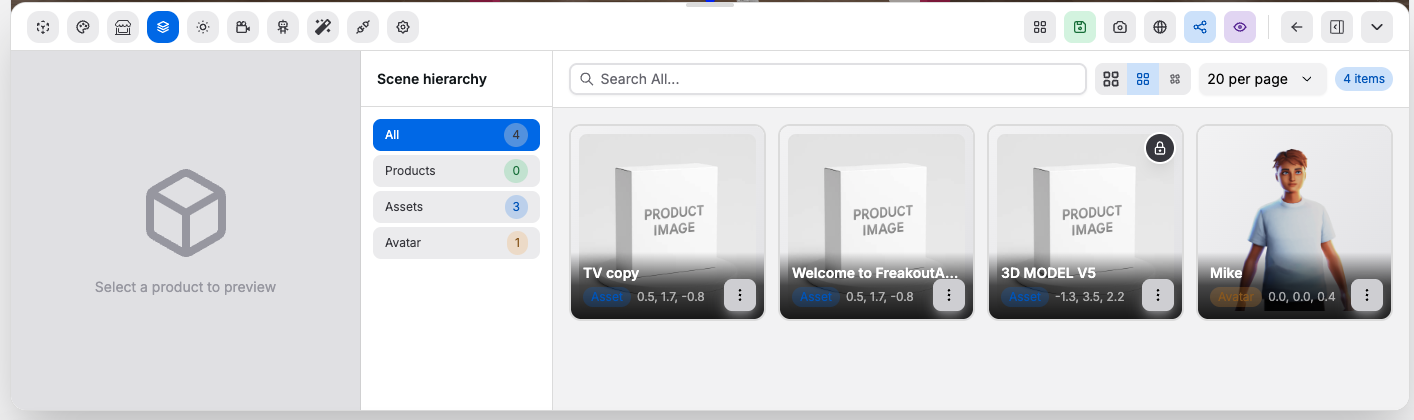
Controls:
- Separate views for
Products,Assets,Avatar, orAll: switch which scene objects are listed - Search: finds placed items by text
- Paging, page size, and grid size controls: change how many items you see and how they are displayed
- Scene hierarchy controls: let you select, deselect, reorder, and remove items
- Scene hierarchy overall: helps you find a placed item quickly without clicking around the canvas
- Transform toolbar: appears after selecting an item and exposes move, rotate, scale, dimension guides, snap, reset, remove, and deselect actions
- Origin override: appears in the transform toolbar for uploaded assets and lets you set the asset pivot with native pivot, bounds center, bounds bottom, or custom X/Y/Z values
Good to know:
- This drawer reflects the current room state
- Avatar controls appear when an avatar is enabled in the room
- Use this drawer when the canvas is crowded and direct selection is slower
- Origin override changes the pivot used for transforms, gizmos, animations, and viewer selection while keeping surface annotations attached to the model