

Commerce AppConnect and pick your store
Unity SDKGet the Unity WebGL SDK
WelcomeStart here and choose your path
Freakout iCommerce
Creative Studio
Room Editor
Enterprise
OverviewWhat the enterprise tier includes
Security & Data ProtectionPrivate storage, signed links and infrastructure controls
Audit Trail & MonitoringWhat we record, and for how long
Data Retention & DeletionAsset lifecycle, purge windows and erasure
Compliance & GDPRFramework alignment and data subject rights
Data Processing AddendumStandard DPA access, coverage, and review flow
Security ChecklistProcurement, DPA, evidence, and contract review items
Freakout SDK
Our LinksSocials, community and support
⌘K
Publish & Settings
Use this area to manage room metadata, embed output, and support requests.
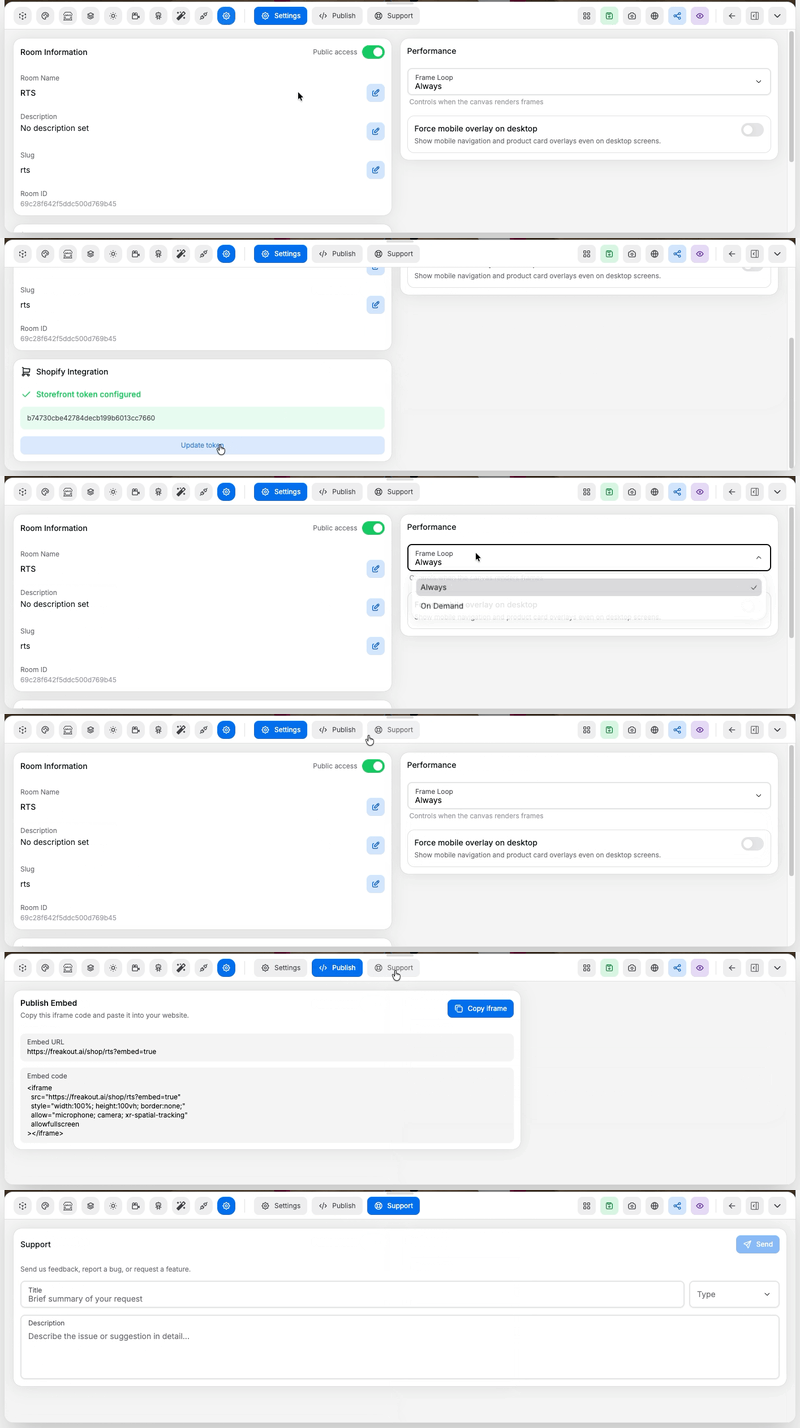 Pages in this area:
- Settings Tab: rename or describe a room, set visibility, and adjust performance options
- Publish Tab: generate the embed code for the room
- Support Tab: report a bug or request a feature