

Scene Hands Tab
 Use
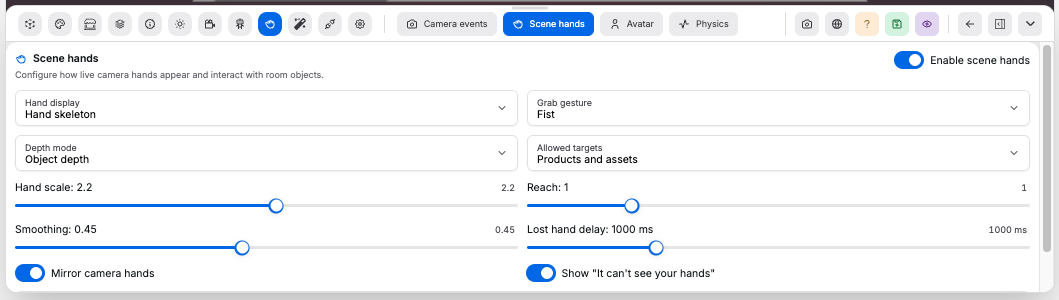
Use Scene hands to show live camera hands, move room objects, or control the scene camera.
Controls:
Enable scene hands: turns hand display and grabbing on or offControl mode: choosesMove objects,Control camera, orCustom actionsHand display: choosesCursors,Hand skeleton, orHiddenHands: chooses whether the viewer acceptsOne handorTwo handsGrab gesture: in non-custom modes, choosesPinch,Fist, orHoldGesture event pairings: inCustom actionsmode, pairsSelect target,Deselect target,Click target,Start grab,Release target,Camera rotate,Camera pan, andCamera zoomwith a gesture- Camera event pairings also choose the motion axis:
X movement,Y movement, orZ movement, plus whether that motion is inverted. Camera pan defaults to inverted Y-style movement - Gesture options include
Pinch,No gesture,Closed fist,Open palm,Pointing up,Thumb up,Thumb down,Victory, andI love you Depth mode: choosesFixed plane,Object depth, orEstimated depthAllowed targets: choosesProducts,Assets,Products and assets, orAll scene objectsHand scale: changes the displayed hand size. Range0.25to4Reach: changes grab reach. Range0to4.0uses target depth when the hand is over a targetHorizontal movement: expands or tightens side-to-side hand projection. Range0.5to3Vertical movement: expands or tightens up-and-down hand projection. Range0.5to3Depth sensitivity: changes estimated-depth movement while grabbing. Range0.5to8Smoothing: changes hand movement smoothing. Range0to1Lost hand delay: delay before showing the lost-hand prompt. Range0 msto4000 msMirror camera hands: mirrors the hand display for front-camera useShow "It can't see your hands": shows the lost-hand prompt when hands leave frameHands push without grabbing: lets hands push physics bodiesRelease behavior: choosesStay,Return,Snap back, orPhysics
Good to know:
- Camera events must be enabled before shoppers can use scene hands
One handmode keeps the current grab or camera-control hand active and ignores the other hand to avoid left/right gesture conflictsControl cameramaps visible hand movement to camera orbit. A grab gesture maps vertical hand movement to camera up/down pan and does not move scene objectsCustom actionshas no default hand-to-scene behavior beyond its gesture map. The default custom map transforms models withClosed fist, rotates the camera withPinch, releases withOpen palm, idles onNo gesture, and selects or opens annotations withPointing up. AssignClick targetto a gesture to press annotation controls or open the nearest annotation under the hand pointer- Object animations pause while that object is grabbed by scene hands
All scene objectsincludes scene geometry withBody Typeset toDynamicEstimated depthanchors the object at grab start, then uses relative palm landmark spread while grabbing. It falls back to relative MediaPipe landmarkzwhen spread is unavailablePhysicsrelease falls with the Physics tab gravity settings, even when runtime physics is offFixed rigid bodyscene geometry collides but cannot be grabbed- With
Hands push without grabbingoff, grabbed objects move without an extra hand collider