

Shadows Tab
Use Shadows for global shadow quality, coverage, and performance tradeoffs.
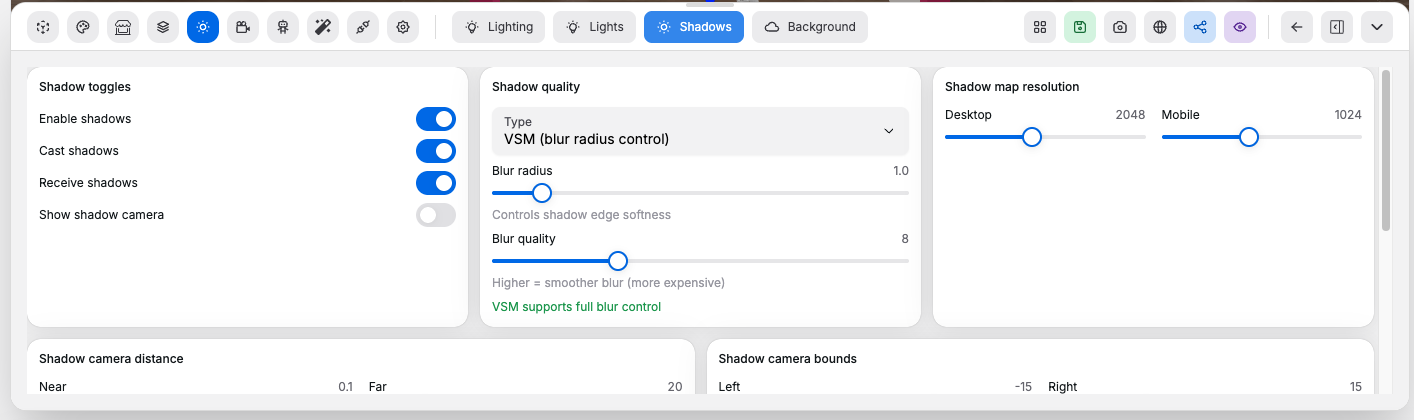
Shadow Toggles#
Controls:
Enable shadows: turns scene shadow rendering on or offCast shadows: allows objects to cast shadowsReceive shadows: allows objects and surfaces to receive shadowsShow shadow camera: displays the shadow camera helper for debugging coverage
Shadow Quality#
Controls:
- Shadow type selector: selects the shadow technique
Blur radius: increases or reduces shadow softnessBlur quality: balances smoother blur against render cost
Shadow Resolution#
Controls:
Desktop: sets the shadow map resolution for larger screensMobile: sets the shadow map resolution for mobile devices
Shadow Camera#
Controls:
Near: sets the near clipping distance of the shadow cameraFar: sets the far clipping distance of the shadow camera- Bounds controls such as
Left,Right,Bottom, andTop: change the shadow camera coverage area Bias: offsets depth sampling to reduce acne artifactsNormal bias: offsets shadows along the surface normal to help on angled geometryIntensity: changes how dark the final shadows appear
Good to know:
- Wider bounds cover more area, but spread the same resolution over a larger space
- Bias controls help reduce shadow acne artifacts