

Background Tab
Use Background to control what appears around the room.
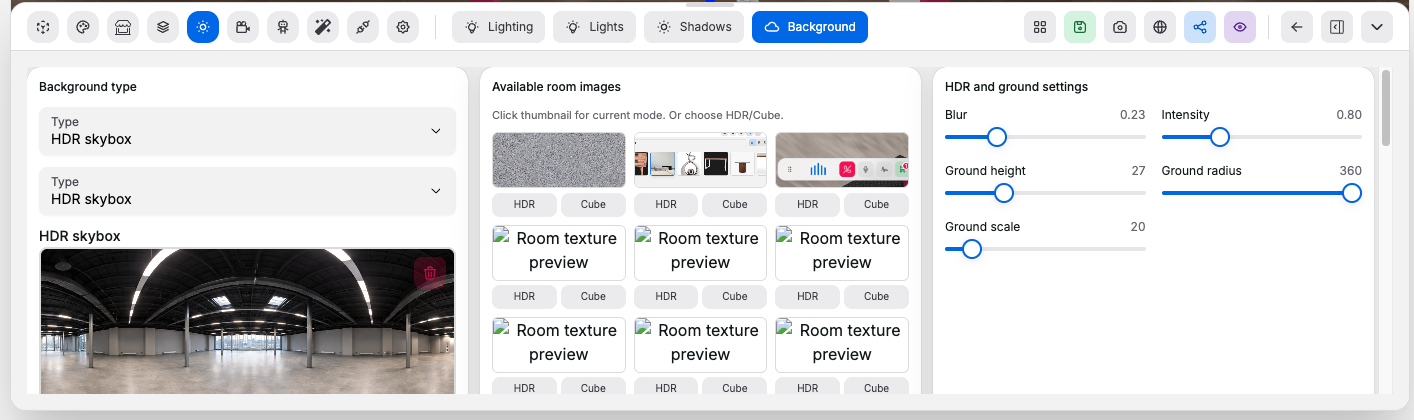
Background Type#
Controls:
- Background type selector: chooses whether the room uses no environment, a generated sky, one uploaded HDR, or a six-face cube environment
No environment: removes sky, HDR, and cube environment rendering so explicit lights and room materials define the sceneProcedural sky: uses a generated sky with editable atmosphere controlsHDR skybox: uses a single HDR or image-based environment6-side cube: uses six separate images to build a cube environment
HDR and Cube Inputs#
Controls:
- HDR preset selector: applies a built-in HDR environment preset
- HDR upload field: uploads a custom HDR or image-based skybox
- Six-side cube uploader: uploads six images for the cube environment faces
Visible: shows or hides the background environmentColor: switches the background from image-based to a flat solid color- Solid color picker: sets the exact flat background color when color mode is enabled
Available Room Images#
Controls:
- Room image thumbnail grid: reuses generated room images or texture outputs as environment inputs
HDRbutton: applies the selected image in HDR-style single-image modeCubebutton: applies the selected image as the source for all six cube faces
Procedural Sky#
Controls:
Elevation: moves the sun angle higher or lowerRotation: rotates the sky around the roomHaze: changes atmospheric turbidity and visual hazeScattering: changes how strongly light scatters through the atmosphere
HDR and Ground Settings#
Controls:
Blur: softens the visible background imageIntensity: changes how strongly the environment contributes light to the roomGround height: shifts the reflected ground plane verticallyGround radius: changes the size of the ground reflection areaGround scale: scales the ground reflection treatmentExposure: brightens or darkens the final environment exposure
Good to know:
- Use no environment for gallery-style or custom-lit rooms that should not show a sky or HDR map
- Use procedural sky when you want a controllable sky
- Use HDR or cube modes when you want an image-based environment